

Every architecture firm I meet has its drawing standards written down somewhere. There is a PDF on SharePoint, a wiki page the BIM manager updates when there is time, a template project, and a lot of knowledge that lives in the heads of the most experienced people in the office. Ask any of those firms what the hard part is and the answer is the same: getting the standards into the drawings.
Firm guidelines have been the foundation of SWAPP's work for years, long before AI agents entered the conversation. Over that time we have watched Revit drawing standards drift in the same ways at firm after firm, and we have come to think the timing of the check matters more than the wording of the rules.
The gap between the guideline PDF and the drawing
A guideline document describes how the office wants its drawings to look. The drawing is what one person produced on one afternoon under a deadline. Consistency gets lost in the distance between the two.
The drift usually starts somewhere ordinary. A project architect transfers in from an office that does things slightly differently, or a junior designer copies a view from an old project that predates the current rules. Then someone tags a plan by hand at 6pm and drops the tags wherever they fit. Each of these is small. Across a full construction document set and a team of several people, they add up to a set that does not look like it came from one firm.
Most firms try to close the gap with templates and training, and both help. Revit lets you apply a view template to all views on a sheet, and Autodesk's help describes that as a way to keep views in line with office standards. View templates are good at graphics: visibility, line weights, scale, detail level. They have nothing to say about where a room tag sits, whether a door mark matches its room number, or whether every wall on the plan carries a tag. Those rules stay in the PDF.
What firm guidelines typically cover
The specifics change from office to office, which is the reason firms write their own. Still, most of the guideline documents we see cover the same families of rules:
- Tag placement. Room tags centered in the room, door tags at a set offset from the door, ceiling tags inside the ceiling on the RCP.
- Numbering and marks. Door marks that follow the room number, with letter suffixes when a room has more than one door. Curtain walls and storefronts numbered in sequence.
- Completeness. Every wall, door, window and room tagged on the plans that go out.
- Dimensioning. Which strings go around the exterior (openings, grids, overall), how interior strings run, and which segments get a prefix or suffix.
- Sheet and view conventions. Viewports aligned across sheets, consistent view names, and the right template on each view type.
Some of these are judgment calls. Many are rules a person could check with a scale and a schedule. The checkable ones are where firms lose the most senior hours, because somebody experienced ends up checking them by eye.
Why end-of-project audits come too late
The usual way to enforce Revit drawing standards is a QA/QC review before an issue. A senior architect or the BIM manager pages through the set with a red pen, marks every tag that is off and every mark that does not match, and hands it back.
That review catches a lot, but it arrives when fixing is most expensive. The team is close to the deadline and the issues are spread across dozens of sheets. The person fixing them is often not the person who made them, so the same drift comes back on the next project. Meanwhile the reviewer spends the session on mechanical checks that a written rule could answer, and has less time for the design questions only an experienced architect can judge.
Quality in architecture is decided while the drawings are being made. An audit at the end measures how far the set drifted. Checks during the work keep the drift from building up in the first place.
Standards inside every action, plus a guideline audit
Frank, our AI Architect, works inside Revit and Archicad from your firm's own guidelines. We built that around two ideas.
The first is that the standards should apply while the work happens, without anyone having to ask. In one recent session with an architecture team, the prompt was three words: "add exterior dimensions." Frank went to the firm guidelines on its own. Nobody wrote a special prompt, and there was no separate checking step or separate system. Many of the rules in a typical guideline document map onto skills Frank already has, for example:
- Center room tags moves existing room tags to the visual center of each room. It handles L, T and U-shaped rooms, rooms with interior columns or islands, and curved walls, so the tag lands inside the space. It repositions tags only and never creates or reassigns them.
- Set door marks from room numbers writes each door's Mark from the room it opens from: a plain number like 101 for a single-door room, and 102-A, 102-B for a room with several doors, in location order. It writes the Mark and nothing else. No door is moved, created or deleted.
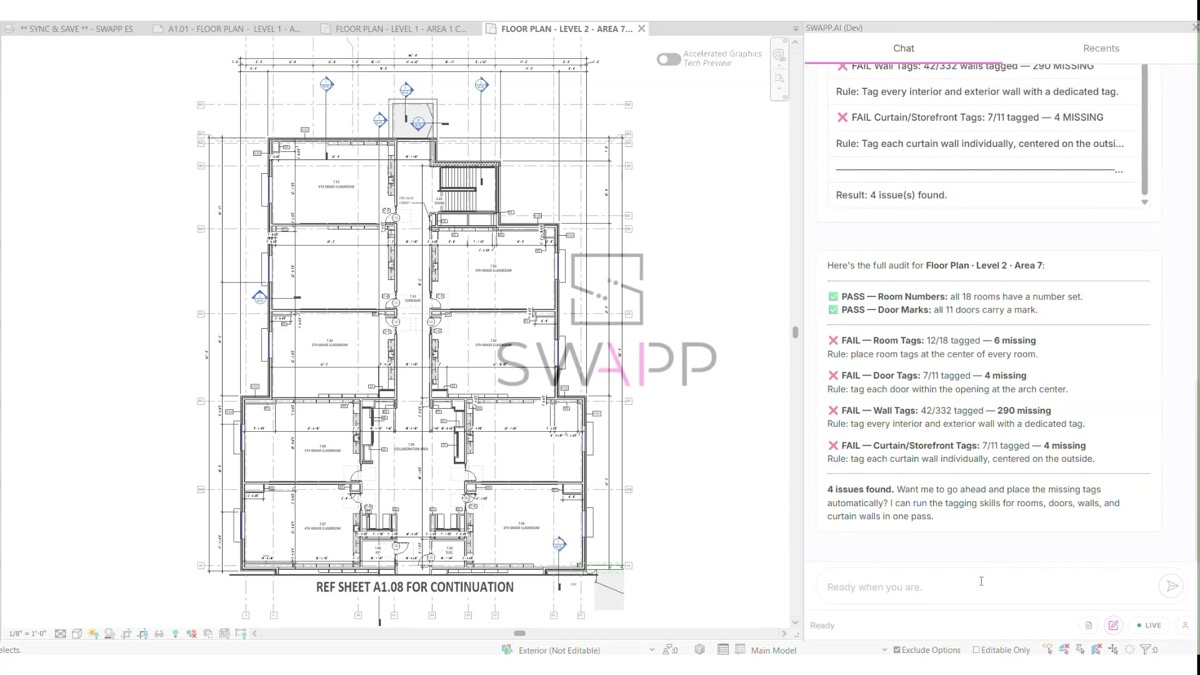
The second idea is a review step that uses the same rules. The guideline audit reads a sheet, finds the rules in your guidelines that apply to it, and checks them one at a time. Each rule comes back as pass or fail with the exact drift, for example "Room Tags: 12 of 18, 6 missing," and every result points back to the rule it checked. When it finds issues, Frank offers to fix them by re-running the relevant skills. Nothing changes until you approve.
Frank can audit its own output the same way it audits anyone else's, so the audit works as a QA companion for the whole team. You see what it flags, and you decide. In most firms the guidelines sit in a PDF nobody opens; run this way, they get checked on real drawings, and the know-how of your best people shows up on sheets they never personally touched.
Measuring consistency across offices
Firms with more than one office have a harder version of this problem. Each office develops its own habits, and the guideline document is often the only thing they truly share. Differences between offices show up in the drawings long before anyone raises them in a meeting.
Because the guideline audit reports each rule separately, it gives a BIM manager something concrete to compare. Run it on current sheets from each office and look at which rules fail most, and where. A rule that fails everywhere probably needs a better template or family. A rule that fails in one office points to a training gap. A rule that people keep interpreting differently may need to be rewritten.
We are also working on how Frank handles guidelines across teams, roles and projects, including guidelines that differ by department. That work is still in development, and we will share it as it ships.
If you want a practical place to start this month:
- Pick five to ten rules from your guidelines that are mechanical and that reviewers flag most often. Tag placement, door marks and tag completeness are good candidates.
- Rewrite each one as a single checkable sentence. "Room tags are centered in the room" can be checked. "Plans should be clear and legible" cannot.
- Check those rules on a handful of current sheets from different teams before the next issue, and note which fail most often.
- Fix whatever sits behind the most common failures, whether that is a template, a tag family or a habit.
Frank for Revit is live in production. If your office works in Archicad, the Archicad resource center collects what we have published for it. To see the guideline audit run against your own standards, start on the Frank page and get in touch from there.