

Blog · 2026-10-16
ADA Restroom Requirements: A Toilet-Room Compliance Checklist for Revit
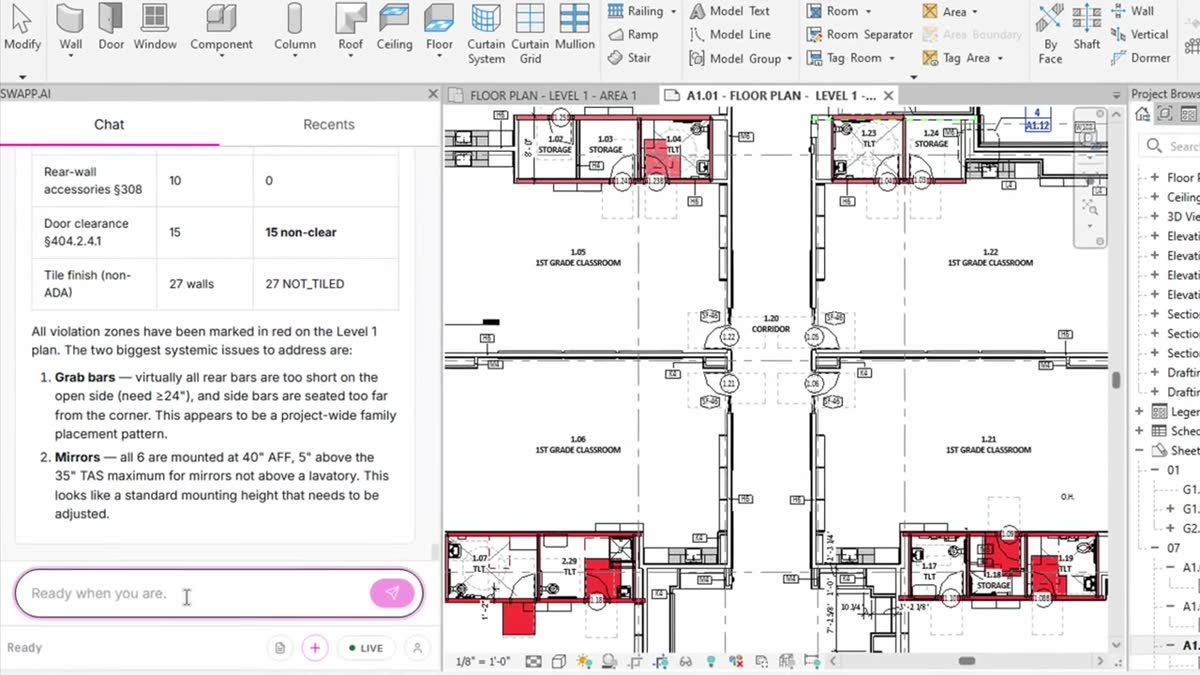
Most accessibility reviews are run as a compliance exercise: someone checks the toilet room plans against the code before permit, marks up what’s wrong, and the set moves on. The real cost of a miss shows up much later. A grab bar mounted a few inches off, or a lavatory that crowds the water closet clearance, is easy to fix on a drawing. Found after the tile is set, it means demolition, rework and a schedule delay that cost far more than catching it during documentation.
This post is a working checklist of ADA restroom requirements for architects documenting toilet rooms in Revit, the modeling mistakes that let violations slip through, and how we audit restrooms with Frank. Section references are to the 2010 ADA Standards for Accessible Design. If you work in Texas, the 2012 Texas Accessibility Standards (TAS) follow the same structure and numbering; TDLR describes TAS as largely identical to the 2010 Standards, with the Texas differences marked in italics.
Why restroom errors cost so much after install
Restrooms pack a lot of tightly toleranced requirements into a small room. Clearances overlap, fixtures sit a few inches apart, and several trades touch the same wall: framing and blocking, plumbing rough-in, tile, partitions and accessories. A dimension that is off on the drawing gets built into the wall by several of those trades before anyone measures it against the code.
Grab bars are the classic example. The bar itself is cheap, but moving it after finishes usually means opening the wall to relocate blocking, then patching and re-tiling. The same is true of a water closet whose centerline is an inch outside the allowed range: the fix means moving the rough-in. That is why we think the documentation phase is the right place to be strict.
The ADA/TAS toilet-room checklist
These are the items we check on every single-user toilet room and every wheelchair accessible stall. The dimensions below come from the 2010 ADA Standards; confirm against the edition your jurisdiction has adopted.
Water closet
- Centerline 16 inches minimum to 18 inches maximum from the side wall or partition (604.2). Ambulatory accessible compartments use 17 to 19 inches.
- Clearance around the water closet 60 inches minimum measured perpendicular from the side wall and 56 inches minimum measured perpendicular from the rear wall (604.3.1). No other fixtures or obstructions may sit inside that clearance (604.3.2).
- Seat height 17 to 19 inches above the finish floor, measured to the top of the seat (604.4).
ADA grab bar requirements (604.5 and 609)
- Grab bars on the side wall closest to the water closet and on the rear wall (604.5).
- Side wall bar 42 inches long minimum, located 12 inches maximum from the rear wall and extending 54 inches minimum from the rear wall (604.5.1).
- Rear wall bar 36 inches long minimum, extending from the water closet centerline 12 inches minimum on one side and 24 inches minimum on the other (604.5.2).
- Bars horizontal, 33 to 36 inches above the finish floor to the top of the gripping surface (609.4).
Toilet paper dispenser
- 7 to 9 inches in front of the water closet, measured to the centerline of the dispenser, with the outlet 15 to 48 inches above the finish floor, and not located behind grab bars (604.7).
Lavatory and mirror
- A forward-approach clear floor space with knee and toe clearance (606.2). The clear floor space is 30 by 48 inches minimum (305.3), and knee clearance is 30 inches wide minimum (306.3.5).
- Front of the rim or counter, whichever is higher, 34 inches maximum above the finish floor (606.3).
- Mirrors above lavatories or countertops with the bottom edge of the reflecting surface 40 inches maximum above the finish floor (603.3).
Accessories, doors and turning space
- Accessories within reach range. For an unobstructed forward reach, that is 48 inches maximum high and 15 inches minimum low (308.2.1).
- Door clear width 32 inches minimum, measured between the face of the door and the stop with the door open 90 degrees (404.2.3).
- Maneuvering clearance at the door that matches its approach direction and swing, per Table 404.2.4.1. The door must not swing into the clear floor space or clearance required for any fixture (603.2.3).
- A turning space inside the room: a 60-inch diameter circle, or a T-shaped space within a 60-inch square (304.3, 603.2.1).
Showers and TAS items
- Transfer showers 36 by 36 inches clear inside, with a 36-inch wide minimum entry (608.2.1).
- Check Texas-specific items, such as accessible benches and baby-changing stations, against the TAS text itself.
Common modeling mistakes that hide violations
Many restroom violations on drawings start as modeling problems. The model says the room is fine because the model is not showing what will be built.
- Walls modeled to the stud face with no tile or finish layer. Every clearance and centerline measured from that wall is off by the thickness of the finish, which can be enough to push a 16-to-18-inch centerline or a 60-inch clearance out of range.
- Grab bars drawn as 2D detail lines or left to the interior elevation, so they don’t exist in the plan model at all.
- Generic fixture families with the wrong footprint or a hosting offset that doesn’t match the specified product.
- Partitions and door swings that were adjusted in plan after the accessibility review, without anyone re-checking the overlaps.
- Accessories placed on elevations at an assumed height that never got coordinated with the grab bar layout.
This is why our audit also checks modeling quality, for example whether restroom walls carry real tile geometry. An audit that measures against the wrong wall face will give you the wrong answer with total confidence.
Auditing restrooms in Revit with one prompt
Frank’s ADA/TAS toilet-room audit runs inside Revit. You name the rooms in plain English, for example “audit room 204” or “check all restrooms on level 2,” and the architect never has to select an element. Frank runs the full set of ADA/TAS checks as an 11-check suite covering water closet clearance and centerline, lavatory clear floor space and knee and toe clearance, grab bars, mirror height, accessory reach, door maneuvering clearance, accessible benches, baby-changing stations and transfer showers.
Each rule is handled by its own focused check with its own geometry queries and its own verdict. The results are composed into one report per room, and every violation is marked as a colored clearance zone on the floor plan, so you can see where the problem is instead of reading a list of section numbers. Adding a new rule means adding another check, without slowing the ones already there.
A few things worth knowing before you run it. The audit works on rooms in the host model, not in a linked one. It only reports: it marks issues but never moves fixtures, and you can ask for report-only output if you don’t want marks in the plan. Frank flags issues for the architect to review; it does not certify compliance. The architect stays in the loop and makes the call on every flag. The audit is part of Frank’s compliance skills, which are generally available.
From “is it compliant?” to “what if we miss it?”
A pass/fail answer is useful, but it treats every deviation as equal. A grab bar that is an inch too short and a door swing that blocks the water closet clearance both read as one line in a report. On site they have very different consequences.
That is why each finding in the audit points to the clause it failed and marks the violation zone in the model, so the team can weigh the consequence and decide what to fix first, before the set goes out.
We think that is where BIM review is heading: from asking only whether a design meets code toward asking what happens on site if it doesn’t. If you want to run the audit on your own toilet rooms, start with Frank.
This checklist is a design aid. It is not legal advice or a code official’s determination. Always confirm requirements against the accessibility code adopted by your jurisdiction.